Stay Organized When Working From Multiple Locations
Table of Contents
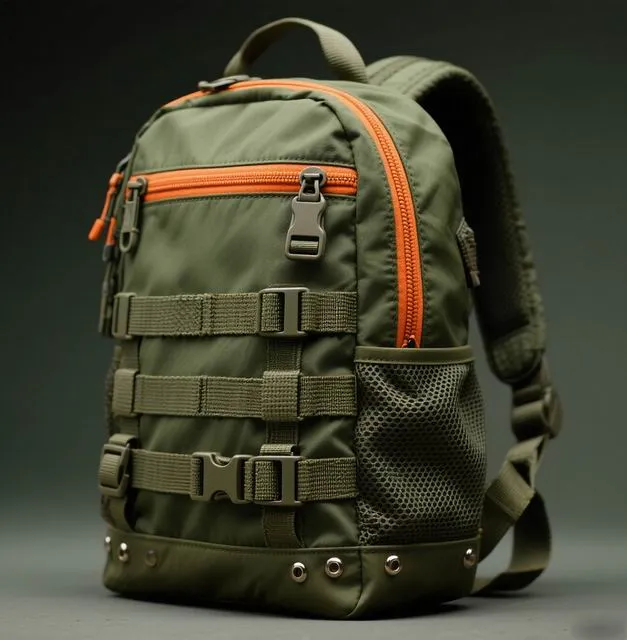 Working from multiple locations is liberating. Without systems, it is chaos.
The Multi-Location Work Reality
Modern professionals increasingly work from three, four, or even five different locations in a single week. Home office on Monday. Co-working space on Tuesday. Client site on Wednesday. Cafe on Thursday. Home again on Friday. This location-hopping lifestyle offers variety, networking opportunities, and flexibility. It also creates an organisation challenge that most people handle poorly.
The core problem is this: when your work life is distributed across locations, information, materials, and routines fragment. You leave chargers at home. Files live on different devices. Meeting notes are scattered across notebooks and apps. Your brain spends energy tracking where things are rather than doing meaningful work. The result is frustration, wasted time, and reduced output.
This guide provides a comprehensive system for staying organised across multiple work locations. It covers both the physical organisation (backpacks, duplicate supplies, transfer kits) and the digital organisation (cloud sync, file management, task tracking) that make multi-location work seamless.
Location Rotation Strategy
The first step to multi-location organisation is planning your location schedule. Spontaneous location changes are the enemy of organisation. A predictable rotation lets you prepare optimally for each environment.
Map your typical week: which days do you work from each location? What are the specific requirements of each? Your home office has a full desktop setup, multiple monitors, and a filing cabinet. The co-working space has WiFi and a desk but nothing else. The cafe has limited space and noisy environments. The client site requires a professional appearance.
Location Requirement Matrix
Home office: Full setup available. Transfer nothing; pick up only what tomorrow's location needs.
Co-working space: Need laptop, charger, headphones, notebook. May need documents or a portable monitor.
Cafe: Need laptop, charger, headphones (essential for noise), and a compact setup for small tables.
Client site: Need laptop, charger, relevant documents, business cards, and a professional bag appearance.
By knowing tomorrow's location tonight, you pack the right bag with the right items. No morning scrambling. No forgotten essentials. No over-packing "just in case."
Duplicate Essentials vs. Transfer Kit
One of the biggest decisions in multi-location work is whether to duplicate items across locations or transfer them daily. The answer depends on usage frequency and item cost.
Duplicate These Items
Any item you need at every location and that costs less than £50 should be duplicated. This includes: chargers (keep one at home, one at the co-working space), a water bottle at each regular location, headphones at each location, a notebook and pen at each location, and toiletries (deodorant, toothbrush) at each location. The total cost of duplication is modest, but the time and frustration saved is enormous.
Transfer These Items
Expensive, bulky, or location-specific items should transfer daily. This includes: your laptop and its primary charger, documents and files needed for specific meetings, project-specific materials, and your professional appearance items (blazer, specific shoes). These items live in your backpack and travel with you between locations.
| Item | Duplicate | Transfer | Reason |
|---|---|---|---|
| Laptop charger | Yes | No | Cheap, needed everywhere |
| Laptop | No | Yes | Expensive, primary device |
| Headphones | Yes | No | Needed everywhere, hygiene |
| Water bottle | Yes | No | Cheap, bulky to transfer |
| Notebook and pen | Yes | No | Cheap, always needed |
| Portable monitor | No | Yes | Expensive, only needed sometimes |
| Documents | No | Yes | Meeting-specific |
| Blazer | No | Yes | Only for client days |
Digital Organisation Systems
Your digital organisation must be location-agnostic. Files, tasks, and notes should be accessible from any device at any location. This requires deliberate setup but pays dividends for years.
The digital organisation stack for multi-location workers includes: cloud file storage (Google Drive, Dropbox, or OneDrive), a task manager that syncs across devices (Todoist, Things 3, or Microsoft To Do), a note-taking app with sync (Notion, Obsidian Sync, or Apple Notes), and a password manager (Bitwarden or 1Password).
The critical principle is that nothing important should live exclusively on one device. Your laptop's local desktop is not a filing system; it is a temporary workspace. All completed work flows to the cloud. All active tasks live in your synced task manager. All reference materials live in your synced note app.
 Cloud-synced tools ensure your work follows you everywhere.
Your Backpack as Mobile Office
Your backpack is the physical anchor of your multi-location work system. It must organise everything you transfer between locations, protect your tech, and present professionally in every environment.
The ideal multi-location backpack has these features: a dedicated, padded laptop compartment; a separate tablet or document sleeve; internal organiser panels for small items; quick-access external pockets for items needed during transit (phone, transit pass, water bottle); a luggage pass-through for travel days; and a clean, professional exterior.
Use packing pouches to create zones within your bag. A tech pouch holds all cables, chargers, and adapters. A document pouch holds notebooks, pens, and papers. A toiletry pouch holds deodorant, hand sanitiser, and breath mints. Each pouch transfers between locations as a unit, maintaining organisation automatically.
 Packing pouches create zones that maintain organisation automatically.
Checklists and Routines
The multi-location professional lives and dies by routines. Without standardised processes, you forget things constantly. With them, organisation becomes automatic.
The Evening Transfer Routine (5 minutes)
Every evening, spend five minutes preparing for tomorrow's location:
- Check tomorrow's calendar for meeting locations and requirements
- Update your backpack: remove items from today's location, add items for tomorrow's
- Charge all devices (laptop, phone, power bank, earbuds)
- Review tomorrow's task list and prepare any specific documents needed
- Set out clothing appropriate for tomorrow's location and weather
The Morning Launch Routine (3 minutes)
Each morning, before leaving:
- Grab pre-packed backpack (items confirmed last evening)
- Quick pocket check: phone, wallet, keys, earbuds
- Check transit or traffic conditions for any disruptions
- Leave with confidence that everything needed is with you
The Location Arrival Routine (2 minutes)
Upon arriving at each location:
- Set up workspace: laptop open, connected to power, monitor positioned
- Open task manager and review today's priorities
- Connect to location's WiFi or personal hotspot
- Put on noise-cancelling earbuds if in a shared environment
These three routines total 10 minutes per day and eliminate virtually all multi-location organisation failures. The consistency is the key; doing the same steps each time builds automatic habits within about three weeks.
Cloud Sync Setup
Cloud sync is the digital backbone of multi-location work. Here is how to set it up properly:
Choose one primary cloud storage provider and commit to it. Google Workspace (Drive + Docs + Calendar) is the most universal. Microsoft 365 (OneDrive + Outlook + Teams) dominates corporate environments. Apple iCloud works seamlessly if all your devices are Apple. The provider matters less than the consistency of use.
Set up automatic sync for all working files. Your Documents folder should sync to the cloud continuously. Your Desktop should sync or at least back up nightly. Your Downloads folder should be cleaned weekly (downloads are temporary by nature).
For note-taking, choose a sync-enabled app and make it your single capture point. Every meeting note, idea, and reference goes into this app. When you switch locations, your notes are already there. No transferring notebooks, no searching for that Post-it.
Physical Organisation Systems
Physical organisation at each location deserves attention. Even temporary workspaces benefit from consistent setup.
At your home office, invest in a proper desk setup: monitor at eye level, keyboard at elbow height, good task lighting, and cable management. This is your productivity base; optimise it fully. At co-working spaces or client sites, your portable kit (laptop stand, external keyboard, noise-cancelling earbuds) recreates the ergonomic benefits of your home setup anywhere.
Keep a small supply of consumables at each regular location: a phone charger, a reusable water bottle, a notepad, and basic toiletries in a drawer or locker. These items never need to transfer because they always wait for you at each location.
Productivity Tips for Location Hopping
Beyond organisation, several productivity principles make multi-location work more effective:
Batch similar-location days: If possible, schedule client meetings on the same day and work from home on others. Fewer transitions mean more productive time.
Match location to task type: Deep focus work belongs at home or in a quiet co-working pod. Collaborative work belongs in open co-working spaces or offices. Creative work might benefit from the ambient noise of a cafe. Align your tasks with the environment that best supports them.
Build transition rituals: The commute between locations is a natural transition point. Use it to mentally close one work mode and open the next. Listen to a specific podcast during transitions, or take a five-minute walk upon arrival at each new location. These rituals signal to your brain that a new work context has begun.
Keep a location log: For the first month, note which locations you worked from, how productive you felt, and what you accomplished. After four weeks, patterns emerge. You may discover that you do your best writing at a specific cafe or that creative brainstorming flourishes at the co-working space. Use this data to optimise your weekly rotation.
Ready to Upgrade Your Mobile Setup?
Whether you need a backpack that doubles as a mobile office or a travel companion for your minimalist kit, we have the solution.
Email: service@junyuanbags.com | WhatsApp: +86 17750020688
Get a Quote Chat on WhatsAppManaging Information Across Locations
The biggest organisation challenge for multi-location workers is not physical; it is informational. When you work from different places, information fragments across devices, notebooks, bookmarks, and conversations. Reconstructing context when you switch locations wastes enormous mental energy. The solution is a single source of truth for all your working information.
Choose one platform as your information hub. Notion, Obsidian, or even a well-structured Google Drive can serve this purpose. Every meeting note, project brief, decision record, and reference document lives here. When you arrive at a new location and open your laptop, you can access your complete working context within seconds. No searching through email threads, no opening random browser tabs to find that document you saved somewhere.
The concept of a second brain applies perfectly to multi-location work. Your second brain is your externalised information system that supplements your biological memory. It includes your note-taking app for ideas and meeting notes, your task manager for commitments and deadlines, your calendar for time allocations, and your file storage for documents and references. Together, these four tools ensure that no important information exists only in your head or on a specific device.
Weekly reviews are essential for maintaining this system. Spend 20 minutes each Friday reviewing your notes, clearing your task manager, updating your calendar for the following week, and filing any loose documents. This weekly ritual prevents information fragmentation from accumulating into chaos. Without it, even the best systems degrade within weeks as uncaptured notes, unprocessed emails, and forgotten commitments pile up.
Health and Wellness While Location Hopping
Organisation is not just about work systems; it includes maintaining your physical health across different environments. Multi-location workers face unique health challenges: inconsistent sleep environments, varying food options, disrupted exercise routines, and the sedentary nature of desk work compounded by commuting between locations.
Build a portable wellness routine that travels with you. This might include a resistance band for hotel room exercises, a yoga mat that packs into your backpack, or a running route planned for each regular location. Consistency matters more than intensity; a 15-minute bodyweight routine done five times per week is more valuable than a 90-minute gym session done once a month.
Nutrition also benefits from a portable system. Carry healthy snacks like nuts, protein bars, and dried fruit in your backpack to avoid vending machine dependence. A reusable water bottle ensures hydration regardless of the location. If your regular locations include a co-working space with a kitchen, keep basic supplies there: olive oil, spices, and non-perishable staples that make preparing simple meals possible even without a full kitchen.
Sleep quality varies dramatically between locations. Invest in a consistent sleep environment kit: an eye mask, earplugs or earbuds with white noise, and a small pillow spray with lavender or eucalyptus. These items weigh under 200 grams combined but create a portable sleep ritual that signals your body it is time to rest, regardless of whether you are in your own bed or a hotel in a different city.
Multi-location work is the future for many professionals. The systems you build today to stay organised across locations will serve you for years to come. Start simple, refine through experience, and remember that consistency in your routines matters more than perfection in your tools.
Frequently Asked Questions
What is the best backpack for working from multiple locations?
Look for a 25 to 30-litre backpack with excellent organisation: dedicated laptop compartment, internal tech pockets, quick-access exterior pockets, and a professional appearance. The Bellroy Transit Backpack, Aer Tech Pack, and Tomtoc 360 all excel at multi-location work.
How do I avoid forgetting items when switching locations?
Use the evening transfer routine: each evening, check tomorrow's location and calendar, then adjust your backpack contents accordingly. Within three weeks, this becomes automatic. A physical checklist taped to your backpack helps during the habit-building phase.
Should I keep duplicate chargers at each location?
Yes, for locations you visit regularly (at least twice weekly). A charger costs £20 to £50 and eliminates a common source of frustration. For locations you visit occasionally, transfer your charger in your backpack instead.
How do I handle confidential documents across locations?
Minimise physical documents entirely; use cloud-based documents with access controls. When physical documents are necessary, keep them in a slim document sleeve in your backpack that transfers with you. Never leave confidential papers at a co-working desk, even temporarily.
What cloud tools work best for multi-location professionals?
The best stack depends on your ecosystem. Google Workspace (Drive, Docs, Calendar, Keep) is the most universal and affordable. Microsoft 365 dominates corporate environments. Notion is excellent for combining notes, tasks, and documents in one sync-enabled workspace. Choose one ecosystem and use it consistently.
How do I stay productive in noisy locations like cafes?
Invest in quality noise-cancelling earbuds or headphones. The Sony WH-1000XM5 or Apple AirPods Pro 2 transform noisy environments into productive ones. Choose locations with background noise levels that help rather than hinder your focus; moderate ambient noise actually improves creative thinking according to research.
What is the ideal location rotation schedule?
There is no universal ideal. Start with a pattern like: home for deep focus days (Monday and Thursday), co-working space for collaboration days (Tuesday and Wednesday), and flexible (cafe or client site) on Friday. Adjust based on your productivity data after the first month.
Ready to Upgrade Your Mobile Setup?
Whether you need a backpack that doubles as a mobile office or a travel companion for your minimalist kit, we have the solution.
Email: service@junyuanbags.com | WhatsApp: +86 17750020688
Get a Quote Chat on WhatsApp