Backpack Compartment Names and Uses Explained

Modern backpacks are marvels of ergonomic engineering, with dozens of compartments, pockets, straps, and attachment points that serve specific functions. Yet most people use only a fraction of their backpack's features because they do not know what each compartment is called, what it is designed for, or what items belong in it. The result is a backpack that could be a precision tool being used as a glorified sack, with laptops tossed in next to shoes and important documents buried at the bottom of a black hole.
This comprehensive guide names and explains every major compartment and feature found on modern backpacks, from commuter daypacks to expedition-grade hiking bags. We cover the purpose of each compartment, the ideal items for it, and how to use each feature effectively. Whether you are shopping for a new backpack and want to understand the features listed in product descriptions, or you already own a feature-rich pack and want to use it to its full potential, this guide will give you the knowledge to make every compartment work for you.
Main Compartment
The main compartment is the largest internal space in your backpack, typically accessed via a top-loading zipper, a panel-loading zipper, or a clamshell opening that unfolds the bag flat. This is where the bulk of your gear goes: clothing, food, cook systems for hikers, or files and folders for commuters. The main compartment is designed to hold items that you do not need to access frequently, which is why it is typically the most enclosed and protected space in the bag.
Panel-loading and clamshell designs offer superior access compared to top-loading because you can see and reach all contents at once. Top-loading designs are lighter and more weather-resistant but require you to unpack from the top down to reach items at the bottom. When choosing a backpack, consider how you will access items most frequently and choose the loading style that matches your workflow.
Laptop Sleeve
The laptop sleeve is a padded compartment, usually positioned against the back panel, designed to hold a laptop computer securely. It is typically suspended slightly above the bottom of the bag so that when you set your backpack down, the laptop does not impact the ground directly. The padding ranges from thin foam in budget bags to thick, plush cushioning in premium bags. Most laptop sleeves accommodate laptops up to 15.6 inches, with larger bags offering sleeves for 17-inch models.
The laptop sleeve should be used exclusively for laptops and tablets. Do not place clothing, food containers, or other items in the laptop sleeve, as this compromises the padding's protective function and can damage both the laptop and the sleeve material over time. If your backpack has a separate tablet sleeve, use it for your tablet to keep devices separated and protected from scratching against each other.
Admin Panel
The admin panel is a small compartment, usually located in the front section of the backpack, designed for organising small items. It typically features pen loops, card slots, key clips, mesh pockets, and elastic organisers. The admin panel is where your pens, business cards, USB drives, SD cards, small notebook, keys, and other small items that benefit from dedicated slots should live. A well-designed admin panel makes these items instantly visible and accessible without digging through the main compartment.
Front Pocket
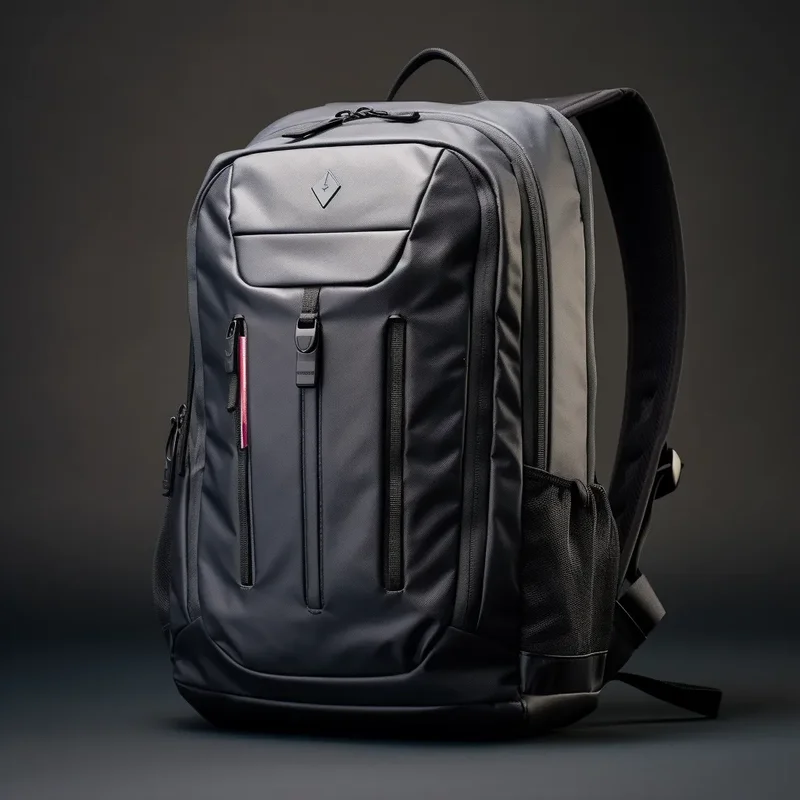
The front pocket is a zippered compartment on the front face of the backpack, outside the main compartment but inside the outer shell. It is typically smaller than the main compartment and is ideal for items you need to access more quickly than main compartment items but that do not need the instant accessibility of outer pockets. Guidebooks, a tablet, a light jacket, chargers, and documents often live here. Some backpacks feature a front pocket with a fleece lining specifically designed for sunglasses or phone storage to prevent scratching.
Side Water Bottle Pockets
Side water bottle pockets are stretch-mesh or elasticised pockets on each side of the backpack, designed to hold water bottles securely while allowing quick one-handed access. They typically accommodate bottles up to one litre in size, though larger pockets can hold Nalgene-size bottles. Beyond water bottles, these pockets are versatile and commonly used for umbrellas, trekking poles (when not in use), small tripods, snacks, and other items that benefit from external, accessible storage.
Hip Belt Pockets
Hip belt pockets are small zippered or elastic pockets attached to the hip belt, common on hiking and travel backpacks. They are designed to hold items you need to access without removing the pack: energy bars, phone, lip balm, small camera, compass, or snacks. The best hip belt pockets are large enough to hold a smartphone and have a secure closure that prevents items from falling out during movement. They are one of the most useful features on any hiking pack and their absence is keenly felt on long days on the trail.
Top Lid and Top Pocket
The top lid, also called the brain on hiking packs, is a removable or fixed pocket on the top of the backpack. It typically has an internal mesh pocket and an external zippered pocket. The top lid is your quick-access zone: items you need frequently or urgently go here because they are accessible without removing the pack or unclipping the main compartment. Navigation tools, first aid supplies, sunscreen, headlamp, and snacks are classic top lid items. On many hiking packs, the top lid is removable and can function as a standalone fanny pack for short excursions from camp.
Bottom Sleeping Bag Compartment
The bottom compartment is a separate zippered section at the base of the backpack, accessed via an external zipper. It is designed for your sleeping bag on hiking trips, keeping it separate from the main compartment and protected from moisture. The compartment typically has internal compression straps to secure the sleeping bag and prevent it from shifting. When not carrying a sleeping bag, this compartment is useful for camp clothes, shoes, or any bulky item that you do not need to access during the day.
Daisy Chains
Daisy chains are rows of webbing loops sewn onto the front or sides of a backpack. They are designed as attachment points for gear, allowing you to clip items to the exterior of the pack using carabiners, cord, or straps. Common uses include attaching trekking poles, ice axes, climbing gear, wet items that need to dry, or additional storage pouches. Daisy chains are most common on hiking and climbing packs but are increasingly found on commuter packs as attachment points for lights and locks.
Lash Points and Attachment Loops
Lash points are reinforced attachment points, typically at the top and bottom of the front panel, designed for securing larger items to the exterior of the pack. Unlike daisy chains which offer multiple small attachment points, lash points are typically two or four robust loops designed for bungee cord or straps that secure items like a foam sleeping pad, tent, or jacket. They are most common on hiking and mountaineering packs where carrying gear externally is standard practice.
Compression Straps
Compression straps are adjustable straps on the sides of the backpack that, when tightened, compress the load and bring items closer to your back for better weight distribution and stability. They also serve a secondary function of securing external items like sleeping pads, tents, or jackets to the sides of the pack. Properly tightened compression straps eliminate internal shifting, reduce noise, and make the pack feel like a solid, unified load rather than a collection of loose items bouncing around inside.
Sternum Strap and Pocket
The sternum strap is a horizontal strap that connects the two shoulder straps across your chest, typically at mid-chest height. It prevents the shoulder straps from sliding outward and distributes load more evenly across your upper body. Many sternum straps include a small pocket, a whistle, or a hydration tube clip. The sternum strap pocket is ideal for a lip balm, energy gel, or small items you want to access without reaching around to your hip belt. The integrated whistle is a safety feature that can be heard much further than the human voice in an emergency.
Hydration Sleeve and Port
The hydration sleeve is an internal sleeve, usually located behind the main compartment against the back panel, designed to hold a hydration bladder. The hydration port is a small opening at the top of the pack that allows the drinking tube to exit and route over your shoulder to your mouth. Hydration systems allow you to drink without stopping or removing your pack, which is essential for maintaining hydration on long hikes. Not all backpacks have a dedicated hydration sleeve, but most hiking packs in the 25-litre-plus range include one.
Full Compartment Reference Table
| Compartment | Location | Primary Purpose | Ideal Items | Found On |
|---|---|---|---|---|
| Main Compartment | Centre of pack | Bulk storage | Clothing, food, gear | All backpacks |
| Laptop Sleeve | Against back panel | Laptop protection | Laptop, tablet | Commuter, travel packs |
| Admin Panel | Front, upper | Small item organisation | Pens, cards, keys, USB | Commuter, travel packs |
| Front Pocket | Front face | Quick access | Jacket, guidebook, charger | Most backpacks |
| Side Pockets | Both sides | Bottle and pole storage | Water bottles, umbrella | Most backpacks |
| Hip Belt Pockets | On hip belt | On-body access | Snacks, phone, lip balm | Hiking, travel packs |
| Top Lid | Top of pack | Quick access essentials | Map, first aid, sunscreen | Hiking packs |
| Bottom Compartment | Base of pack | Sleep system storage | Sleeping bag, camp clothes | Hiking packs 45L plus |
| Daisy Chains | Front panel | External attachment | Carabiner clips, gear | Hiking, climbing packs |
| Lash Points | Top and bottom front | Large item securing | Sleeping pad, tent, jacket | Hiking packs |
| Compression Straps | Sides | Load stabilisation | Internal compression, external gear | Hiking, travel packs |
| Sternum Strap | Chest level | Load distribution | Stability, small pocket, whistle | Hiking, travel packs |
| Hydration Sleeve | Behind main compartment | Bladder storage | Hydration bladder | Hiking packs 20L plus |
Understanding Compartment Layouts by Pack Type
Different types of backpacks prioritise different compartment layouts based on their intended use. Commuter backpacks emphasise laptop protection and admin organisation. Hiking backpacks prioritise external attachment points and hydration compatibility. Travel backpacks focus on clamshell access and carry-on compliance. Understanding these design philosophies helps you choose a backpack that matches your actual needs rather than one that looks impressive but does not serve your specific use case.
Key Takeaway
Every compartment on your backpack has a purpose. The main compartment stores bulk items, the laptop sleeve protects electronics, the admin panel organises small items, side pockets hold bottles and poles, and external features like daisy chains and compression straps enable gear attachment. Knowing what each compartment is for allows you to use your backpack as the engineered tool it was designed to be.
Lesser-Known Compartments and Features
Beyond the major compartments listed above, many modern backpacks include additional features that are less obvious but equally purposeful. Understanding these features ensures you get full value from your backpack's design.
Shove-It Pocket
The shove-it pocket, also called a kangaroo pocket or stretch pocket, is a large elastic or stretch-mesh pocket on the front of the backpack, outside the front zippered pocket. It is designed for items you need to stash quickly without using a zipper: a rain jacket, a map, a sandwich, or a wet layer. The stretch material holds items securely while allowing near-instant access. This feature is particularly popular on hiking and running packs where speed of access matters.
Hidden Security Pocket
Some travel backpacks include a hidden pocket, typically positioned against the back panel between the backpack and your body. This pocket is not visible from the outside and is accessed via a discreet zipper. It is designed for valuables like passports, cash, and credit cards that you want to keep secure in crowded environments. The positioning against your body makes pickpocketing virtually impossible. Not all backpacks have this feature, but it is increasingly common on travel-focused designs.
Floating Lid
A floating top lid is one that can be raised or lowered by adjusting the attachment straps, accommodating varying amounts of gear in the main compartment. When the pack is lightly loaded, the lid sits lower for a streamlined profile. When the pack is stuffed full, the lid rises to accommodate the extra volume. This feature is common on technical hiking packs and allows the same pack to handle a range of load volumes without feeling either too loose or too tight.
Front Panel Pocket withorganisation
Premium commuter and travel backpacks sometimes feature a front panel pocket with built-in organisation similar to the admin panel but on a larger scale. This can include dedicated tablet sleeves, elastic loops for chargers and cables, mesh pockets for accessories, and even a soft-lined sunglasses compartment. These features replace the need for separate organiser pouches and keep your most-used items in the most accessible location on the entire pack.
Removable Frame Sheet
Some ultralight and minimalist backpacks use a removable foam frame sheet that provides structure and load transfer. The frame sheet can be removed to save weight for short trips or left in place for longer carries. Understanding this feature is important when choosing an ultralight pack because it affects how the pack carries under different loads. With the frame sheet in, the pack handles loads of up to 12 kg comfortably. Without it, the pack is best suited for loads under 7 kg.
How Compartment Design Affects Packing Strategy
Understanding your backpack's compartments is not just academic; it directly affects how you pack and how comfortable your carry will be. A backpack with a separate laptop sleeve against the back panel naturally positions your heaviest electronic item close to your spine, which is optimal for weight distribution. A backpack with multiple outer pockets encourages you to distribute weight across the surface of the pack, which can be beneficial for balance but may reduce access speed to the main compartment.
When choosing a backpack, map your typical carry items to the compartments each bag offers. If you carry a laptop daily, ensure the laptop sleeve fits your specific model. If you hike with trekking poles, confirm the pack has adequate lash points or side compression straps. If you travel with a camera, look for a pack with a dedicated camera cube or at least a main compartment wide enough to accommodate one. The right compartment layout for your specific needs makes every trip more comfortable and efficient.
Maintaining Your Backpack Compartments
Backpack compartments require basic maintenance to function properly over time. Zippers should be kept clean and occasionally lubricated with a zipper wax or graphite pencil to prevent sticking. Velcro closures should be kept free of lint and debris that reduces their grip. Mesh pockets should be checked for tears and repaired early with gear tape before the damage spreads. The interior of compartments should be emptied and vacuumed periodically to remove crumbs, dust, and debris that accumulate over months of use. A well-maintained backpack keeps its compartments functional and its zippers smooth for many years of regular use.
Choosing a Backpack Based on Compartment Needs
When shopping for a new backpack, start by listing the items you carry daily or on typical trips, then map each item to the compartment where it should live. If the backpack you are considering lacks a compartment for a key item, you have two options: choose a different bag, or accept that the item will live in a suboptimal location. Most experienced backpack buyers find that the compartment layout is more important to long-term satisfaction than any single feature like water resistance or fabric weight. A well-compartmented bag that matches your carry needs will serve you better for years than a technically superior bag that does not fit how you actually pack and access your gear.
Frequently Asked Questions
What is the main compartment of a backpack?
The main compartment is the largest internal space in a backpack, used for bulk storage of clothing, food, gear, and other primary items. It is typically accessed via a top-loading, panel-loading, or clamshell zipper and holds the majority of your pack's contents.
What is the laptop sleeve in a backpack?
The laptop sleeve is a padded compartment positioned against the back panel, designed to hold a laptop computer securely. It is suspended above the base of the bag to protect the laptop from impact when the bag is set down. It should be used only for laptops and tablets.
What is the admin panel on a backpack?
The admin panel is a small front compartment with organised slots, pen loops, card holders, and mesh pockets for small items like pens, business cards, USB drives, keys, and SD cards. It makes small items instantly visible and accessible.
What are daisy chains on a backpack?
Daisy chains are rows of webbing loops sewn onto the exterior of a backpack, typically on the front panel. They serve as attachment points for clipping gear, tools, and accessories to the outside of the pack using carabiners or cord.
What is a top lid on a hiking backpack?
The top lid, also called the brain, is a pocket on the top of a hiking backpack used for quick-access items like navigation tools, first aid supplies, sunscreen, and snacks. On many packs, the top lid is removable and can function as a standalone hip pack.
What are compression straps for?
Compression straps are adjustable straps on the sides of a backpack that tighten the load, bringing items closer to your back for better stability and weight distribution. They also secure external items like sleeping pads to the pack.
What is a sternum strap and why do I need one?
A sternum strap is a horizontal chest strap that connects the shoulder straps, preventing them from sliding outward and distributing load more evenly. It improves comfort and stability, especially under heavy loads, and many include an integrated emergency whistle.
What is the hydration sleeve in a backpack?
The hydration sleeve is an internal sleeve behind the main compartment designed to hold a hydration bladder. Combined with a hydration port for the drinking tube, it allows you to drink without stopping or removing your pack, which is essential for maintaining hydration on the trail.
Explore More Packing & Organisation Guides
Continue building your packing expertise with our related guides:
How to Organise Your Backpack | Backpack Packing Order | Weight Distribution Guide | 15 Backpack Organisation Hacks | Best Backpack Organisers